
.png)
Intro
MCP servers are not just integrations. They are trust boundaries.
The Model Context Protocol helps agents connect to tools, APIs, data sources, and external systems. That is useful because it lets an agent move from answering questions to taking action. But the same capability also changes the security model.
Once an agent can call tools, the key question is no longer only:
Can the model respond safely?
It becomes:
What can this agent read, write, call, or change?
This blog explains why MCP expands the agent attack surface, what teams should review before connecting third-party MCP servers, and where runtime controls fit after deployment.
Problem
Traditional application security usually tests known paths: APIs, authentication, authorization, input validation, dependency risk, exposed secrets, and infrastructure configuration.
Agentic systems add a different layer.
An MCP-connected agent may read context, select a tool, generate parameters, call an external system, interpret the result, and decide what to do next. That chain can be influenced by user prompts, retrieved documents, tool descriptions, tool outputs, session state, or third-party server behavior.
This creates a practical security gap.
A tool may be valid. The API may be working as designed. The user may have some permission. But the agent may still take an action the workflow should never allow.
MCP security guidance highlights risks such as confused deputy problems, token passthrough, SSRF, session hijacking, and local MCP server compromise. OWASP guidance for third-party MCP servers also points to risks like tool poisoning, prompt injection, memory poisoning, tool interference, and over-broad access.
The common thread is simple: MCP servers expand what the agent can do.
That means teams need to evaluate MCP as part of the agent security boundary, not as a harmless connector layer.
Solutions
A practical MCP security review should cover both pre-production testing and runtime enforcement.
1. Map every connected MCP server
Start with an inventory.
For each server, document:
- What tools does it expose?
- What data can it read?
- What systems can it call?
- What actions can it perform?
- Does it support write, delete, update, or approval flows?
- Can it reach internal services or sensitive systems?
- Is it local, remote, first-party, or third-party?
This gives teams a basic tool graph. Without this map, it is hard to reason about blast radius.
2. Scope access by task, not convenience
Do not give agents broad access simply because the user or application has broad access.
For every MCP server, ask:
- What is the minimum permission required?
- Can read and write actions be separated?
- Can sensitive tools be disabled by default?
- Can high-risk actions require human approval?
- Can permissions be scoped by environment, identity, tenant, or data class?
Least privilege matters more for agents because agents can chain actions together. A small over-permission in one step can become a serious workflow risk three steps later.
3. Treat tool metadata and output as untrusted input
In MCP workflows, tool descriptions, tool results, and external content may influence the model’s next decision.
That means teams should not only validate user prompts. They should also evaluate:
- Tool descriptions
- Tool parameters
- Retrieved content
- API responses
- File contents
- Error messages
- Tool output passed into another tool
A malicious or compromised source can hide instructions inside content that looks like normal data. For agents, this can become workflow injection.
4. Review authentication and session handling
MCP implementations should be reviewed for authorization flow risks, token handling, and session isolation.
Practical checks include:
- Avoid token passthrough patterns.
- Validate token audience and scope.
- Do not use sessions as authentication.
- Rotate or expire session identifiers.
- Bind sessions to user identity where appropriate.
- Log which client, user, and tool triggered each action.
- Require explicit approval for new local MCP server execution.
These controls help prevent the MCP layer from becoming a blind proxy into more sensitive systems.
5. Test unsafe trajectories before production
MCP risk is not always visible in a single prompt or single tool call.
Test complete workflows:
- Can the agent call a tool it should not use?
- Can hostile retrieved content change tool selection?
- Can one tool’s output manipulate another tool’s input?
- Can the agent access data outside the intended user or tenant boundary?
- Can the agent trigger write actions without approval?
- Can the agent leak secrets through summaries, logs, or tool responses?
The goal is to test the agentic decision boundary: where the system moves from acceptable assistance to unsafe action.
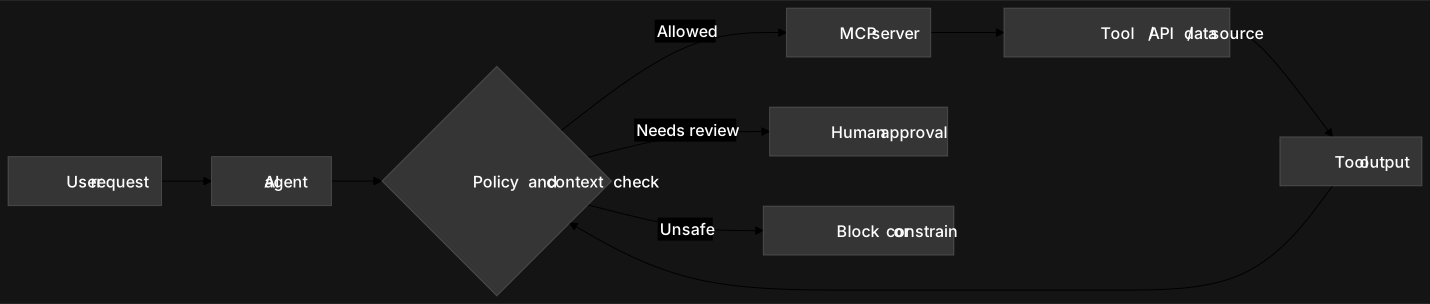
6. Add runtime controls for live agent behavior
Pre-production testing is necessary, but it is not enough.
Agents are non-deterministic. New tools, prompts, data, and workflows can change behavior after launch.
Runtime controls should observe the request, understand the policy boundary, and intervene when needed.
That intervention may be:
- Allow
- Block
- Redact
- Constrain
- Require approval
- Alert an owner
- Create evidence for review
For MCP-connected agents, runtime security should focus on the next action, not only the final answer.
dwaar’s POV
dwaar’s view is that agent security should be tested at the workflow level.
For MCP-connected systems, it is not enough to ask whether a prompt is safe or whether an API is secure in isolation. Teams need to test how the agent behaves across prompts, tools, retrieval, policies, permissions, and actions.
That means using adversarial prompts as test cases, capturing evidence and severity, mapping risky behavior to the affected boundary, and converting findings into enforceable policies.
Before deployment, this helps teams find where the tool graph can break.
At runtime, it helps them observe, understand, and intervene when an agent crosses a real security boundary.
MCP makes agents more useful. It also makes security more urgent.
The practical takeaway for agent builders is simple:
Before adding a new MCP server, ask what capability it gives the agent.
Then ask what boundary it creates.